> ## Documentation Index
> Fetch the complete documentation index at: https://docs.keystn.com/llms.txt
> Use this file to discover all available pages before exploring further.
# Employees
> The employee directory stores records for loan officers, processors, assistants, and managers, driving loan assignments and commission calculations.
## The employee directory
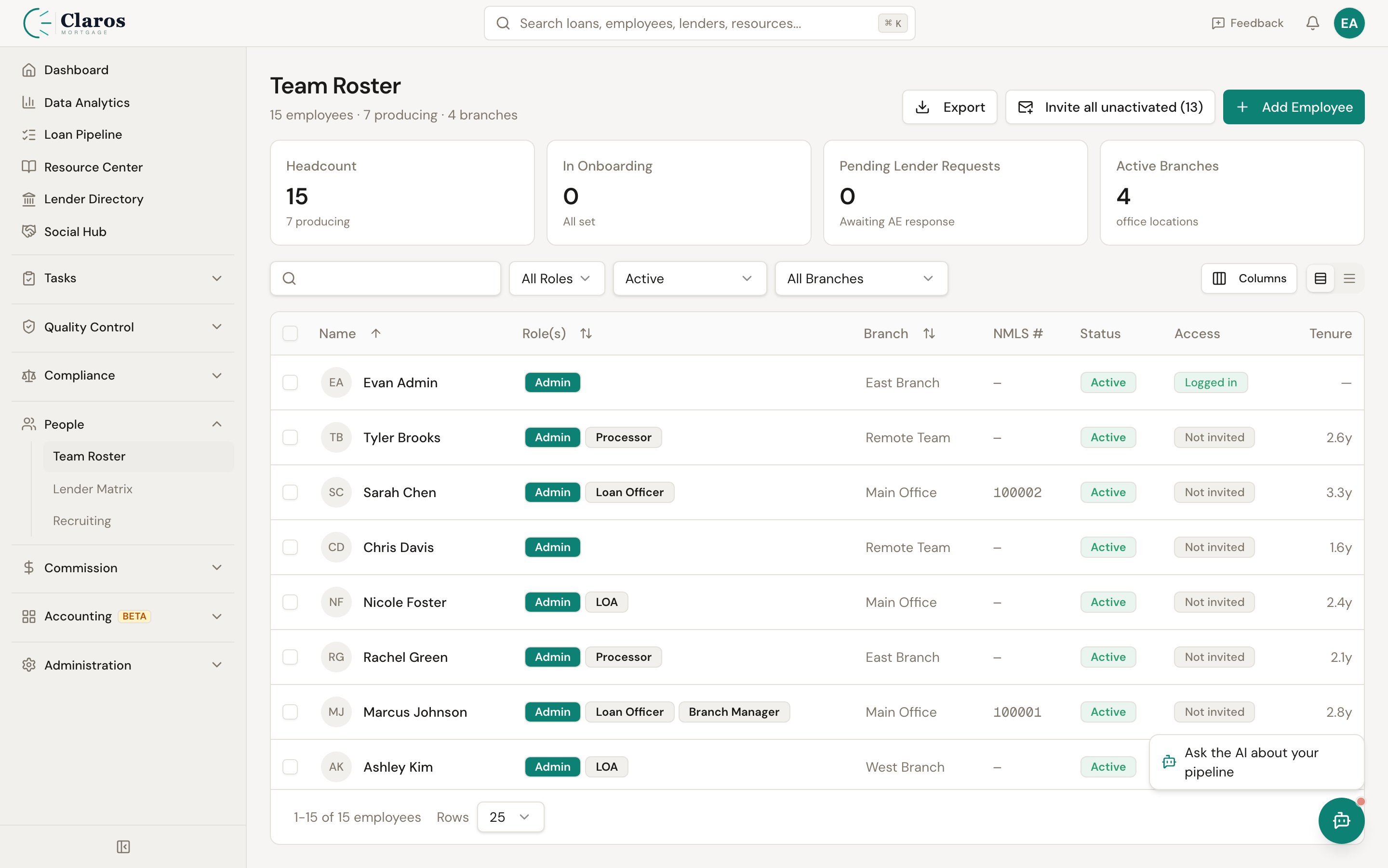
Go to **Directories > People** in the sidebar to view the employee directory.
The directory displays a searchable, filterable table with the following columns:
| Column | Description |
| ----------- | ---------------------------------------------------------------- |
| **Name** | Full name (first + last), with custom title shown beneath if set |
| **Role(s)** | One or more role badges (e.g., "Loan Officer," "Processor") |
| **Branch** | The branch the employee is assigned to, or "-" if unassigned |
| **Email** | Email address |
| **Phone** | Mobile number |
| **Status** | Active or Inactive (archived) badge |
Clicking an employee's name takes you to their detail view.
 ### Filtering employees
The filter bar above the table provides four controls:
* **Search** -- Free-text search across employee names
* **Role** -- Filter by a specific role (Loan Officer, LOA, Processor, Contractor, Branch Manager) or show all
* **Status** -- Show Active employees, Inactive (archived) employees, or all
* **Branch** -- Filter by a specific branch (only appears if branches exist)
***
## Adding a new employee
1. Navigate to **Directories > People**.
2. Click the **Add Employee** button.
3. Complete the form (described below).
4. Click **Create Employee**.
The employee form is organized into three sections.
### Basic Information
| Field | Required | Description |
| ----------------- | -------- | ------------------------------------------------------------------------------------- |
| **First Name** | Yes | Employee's legal first name |
| **Last Name** | Yes | Employee's legal last name |
| **Title** | No | Custom title for display (e.g., "Senior Loan Officer"). Max 100 characters. |
| **Email** | No | Email address. Used for notifications and system access if an auth account is linked. |
| **Mobile Number** | No | Mobile phone number |
| **NMLS ID** | No | The employee's individual NMLS number (distinct from the company NMLS) |
### Employment
| Field | Required | Description |
| ---------------------- | ------------------ | ------------------------------------------------------------------------------------------------------ |
| **Branch** | No | The branch this employee belongs to. Select from a dropdown of existing branches. |
| **Tax Classification** | No | **W-2** or **1099**. Determines how the employee is treated for payroll and tax purposes. |
| **Start Date** | No | The date the employee started with the company |
| **Termination Date** | No | The date the employee's employment ended. Setting this effectively marks the employee as former staff. |
| **Roles** | Yes (at least one) | Check all roles that apply. An employee can hold multiple roles simultaneously. |
#### Available roles
| Role | Typical responsibilities |
| -------------------------------- | ---------------------------------------------------------------------------------------------------------------------- |
| **Loan Officer** | Originates loans, works directly with borrowers. The primary role for production tracking and commission calculations. |
| **Loan Officer Assistant (LOA)** | Supports a loan officer with file preparation and borrower communication |
| **Processor** | Manages the loan file through underwriting and closing |
| **Contractor** | External contractor, typically paid on a 1099 basis |
| **Branch Manager** | Oversees a branch and its staff. Branch managers can be assigned as the manager for one or more branches. |
### Draw and Payroll
Draw settings determine whether and how much an employee receives as a guaranteed minimum payment (draw) during each pay period, before commission calculations.
| Field | Required | Description |
| -------------------- | -------------------------- | --------------------------------------------------------------------------------- |
| **Draw Type** | No (defaults to "No Draw") | The method used to calculate the employee's draw |
| **Draw Amount** | Conditional | Only shown when Draw Type is **Flat Amount**. The fixed dollar amount per period. |
| **Hourly Rate** | Conditional | Only shown when Draw Type is **Hourly**. The per-hour pay rate. |
| **Hours Per Period** | Conditional | Only shown when Draw Type is **Hourly**. Number of hours expected per pay period. |
#### Draw calculation types
| Type | How it works |
| --------------- | -------------------------------------------------------------------------------------------------- |
| **No Draw** | Employee receives no guaranteed draw. They are paid purely on commission. |
| **Flat Amount** | Employee receives a fixed dollar amount as a draw each pay period (e.g., \$2,000/period). |
| **Hourly** | Employee's draw is calculated as `hourlyRate x hoursPerPeriod` (e.g., \$25/hr x 80 hrs = \$2,000). |
Company-wide draw defaults are configured in [Company Settings](/company-setup/company-settings). Individual employee settings override the company defaults.
***
## Additional employee fields
The following fields are available on the employee detail page:
| Field | Description |
| ---------------------------- | -------------------------------------------------------------------------------------------------------------------------------- |
| **Draw Balance** | The current running balance of draws paid vs. commissions earned. Managed automatically by the commission system. |
| **Draw Carry-Over Disabled** | When checked, the employee's draw balance resets to zero each period instead of carrying over. |
| **Profile Image** | A URL to the employee's profile photo |
| **Analytics-Only** | When enabled, the employee appears in analytics and reports but is excluded from commission processing |
| **Setup Complete** | Flag indicating whether the employee's profile has been fully configured |
| **Archived** | Marks the employee as inactive. Archived employees are hidden from most views by default but their historical data is preserved. |
| **Hidden** | Hides the employee from the directory without archiving them |
| **Hide From Directory** | Similar to Hidden; prevents the employee from appearing in the public-facing directory |
| **Preferred Name** | A nickname or preferred name |
| **Introduction** | A brief bio or introduction text |
| **Birthday** | The employee's date of birth |
| **Town** | The employee's home city or town |
| **Payroll Provider ID** | An external ID linking to a third-party payroll system |
***
## State licensing
Loan officers and other NMLS-licensed employees need state-level licenses to originate loans. Keystone tracks these per employee.
Each state license record includes:
| Field | Description |
| ------------------- | ------------------------------------------------------------------------------------------- |
| **State** | The US state the license is issued in (all 50 states plus DC and territories are supported) |
| **License Number** | The license number issued by that state |
| **Expiration Date** | When the license expires |
State licenses are displayed in the **Licenses** tab on the employee detail page.
***
## Editing an employee
Open the employee's detail page, click **Edit**, update any fields, and click **Save Changes**.
***
## Employee detail view
The employee detail page shows a tabbed interface with four sections:
### Info tab
Displays the employee's contact information (email, mobile, NMLS, branch) and employment details (tax classification, start date, termination date, draw type and amounts).
### Loans tab
Lists all loans where the employee is assigned as the loan officer, including:
* Broker loan number (links to the loan detail page)
* Borrower name
* Loan amount
* Current status
### Commissions tab
Shows all active commission rules assigned to the employee, grouped by commission template. Each rule displays:
* Amount type (percentage, basis points, or flat dollar)
* Amount value
* Recipient (if the commission flows to another employee)
* Rule state (e.g., state-specific rules)
### Licenses tab
Displays the employee's state licenses with state abbreviation, license number, and expiration date.
***
## How employees connect to other data
### Loans
Employees can be associated with loans in three capacities:
* **Loan Officer** -- the originator of the loan; the primary employee tied to production
* **Loan Officer Assistant (LOA)** -- assigned to assist on specific loans
* **Processor** -- assigned to process specific loans
### Commissions
Commission rules reference employees as the originating loan officer or as an alternative recipient (e.g., a branch manager override).
### Expenses
Employees can have both one-time and recurring expenses associated with them (e.g., desk fees, technology charges). These are deducted during commission processing.
### Branches
Each employee belongs to zero or one branch. The employee's branch assignment affects reporting roll-ups, commission rule scoping, and management hierarchy.
***
## Related pages
* [Branches](/company-setup/branches) -- employees are assigned to branches
* [Company Settings](/company-setup/company-settings) -- company-wide draw and payroll defaults
* [Lenders](/company-setup/lenders) -- lenders are associated with loans, which are in turn tied to employees
* [Lead Sources](/company-setup/lead-sources) -- lead sources can be used in commission rules that reference employees
### Filtering employees
The filter bar above the table provides four controls:
* **Search** -- Free-text search across employee names
* **Role** -- Filter by a specific role (Loan Officer, LOA, Processor, Contractor, Branch Manager) or show all
* **Status** -- Show Active employees, Inactive (archived) employees, or all
* **Branch** -- Filter by a specific branch (only appears if branches exist)
***
## Adding a new employee
1. Navigate to **Directories > People**.
2. Click the **Add Employee** button.
3. Complete the form (described below).
4. Click **Create Employee**.
The employee form is organized into three sections.
### Basic Information
| Field | Required | Description |
| ----------------- | -------- | ------------------------------------------------------------------------------------- |
| **First Name** | Yes | Employee's legal first name |
| **Last Name** | Yes | Employee's legal last name |
| **Title** | No | Custom title for display (e.g., "Senior Loan Officer"). Max 100 characters. |
| **Email** | No | Email address. Used for notifications and system access if an auth account is linked. |
| **Mobile Number** | No | Mobile phone number |
| **NMLS ID** | No | The employee's individual NMLS number (distinct from the company NMLS) |
### Employment
| Field | Required | Description |
| ---------------------- | ------------------ | ------------------------------------------------------------------------------------------------------ |
| **Branch** | No | The branch this employee belongs to. Select from a dropdown of existing branches. |
| **Tax Classification** | No | **W-2** or **1099**. Determines how the employee is treated for payroll and tax purposes. |
| **Start Date** | No | The date the employee started with the company |
| **Termination Date** | No | The date the employee's employment ended. Setting this effectively marks the employee as former staff. |
| **Roles** | Yes (at least one) | Check all roles that apply. An employee can hold multiple roles simultaneously. |
#### Available roles
| Role | Typical responsibilities |
| -------------------------------- | ---------------------------------------------------------------------------------------------------------------------- |
| **Loan Officer** | Originates loans, works directly with borrowers. The primary role for production tracking and commission calculations. |
| **Loan Officer Assistant (LOA)** | Supports a loan officer with file preparation and borrower communication |
| **Processor** | Manages the loan file through underwriting and closing |
| **Contractor** | External contractor, typically paid on a 1099 basis |
| **Branch Manager** | Oversees a branch and its staff. Branch managers can be assigned as the manager for one or more branches. |
### Draw and Payroll
Draw settings determine whether and how much an employee receives as a guaranteed minimum payment (draw) during each pay period, before commission calculations.
| Field | Required | Description |
| -------------------- | -------------------------- | --------------------------------------------------------------------------------- |
| **Draw Type** | No (defaults to "No Draw") | The method used to calculate the employee's draw |
| **Draw Amount** | Conditional | Only shown when Draw Type is **Flat Amount**. The fixed dollar amount per period. |
| **Hourly Rate** | Conditional | Only shown when Draw Type is **Hourly**. The per-hour pay rate. |
| **Hours Per Period** | Conditional | Only shown when Draw Type is **Hourly**. Number of hours expected per pay period. |
#### Draw calculation types
| Type | How it works |
| --------------- | -------------------------------------------------------------------------------------------------- |
| **No Draw** | Employee receives no guaranteed draw. They are paid purely on commission. |
| **Flat Amount** | Employee receives a fixed dollar amount as a draw each pay period (e.g., \$2,000/period). |
| **Hourly** | Employee's draw is calculated as `hourlyRate x hoursPerPeriod` (e.g., \$25/hr x 80 hrs = \$2,000). |
Company-wide draw defaults are configured in [Company Settings](/company-setup/company-settings). Individual employee settings override the company defaults.
***
## Additional employee fields
The following fields are available on the employee detail page:
| Field | Description |
| ---------------------------- | -------------------------------------------------------------------------------------------------------------------------------- |
| **Draw Balance** | The current running balance of draws paid vs. commissions earned. Managed automatically by the commission system. |
| **Draw Carry-Over Disabled** | When checked, the employee's draw balance resets to zero each period instead of carrying over. |
| **Profile Image** | A URL to the employee's profile photo |
| **Analytics-Only** | When enabled, the employee appears in analytics and reports but is excluded from commission processing |
| **Setup Complete** | Flag indicating whether the employee's profile has been fully configured |
| **Archived** | Marks the employee as inactive. Archived employees are hidden from most views by default but their historical data is preserved. |
| **Hidden** | Hides the employee from the directory without archiving them |
| **Hide From Directory** | Similar to Hidden; prevents the employee from appearing in the public-facing directory |
| **Preferred Name** | A nickname or preferred name |
| **Introduction** | A brief bio or introduction text |
| **Birthday** | The employee's date of birth |
| **Town** | The employee's home city or town |
| **Payroll Provider ID** | An external ID linking to a third-party payroll system |
***
## State licensing
Loan officers and other NMLS-licensed employees need state-level licenses to originate loans. Keystone tracks these per employee.
Each state license record includes:
| Field | Description |
| ------------------- | ------------------------------------------------------------------------------------------- |
| **State** | The US state the license is issued in (all 50 states plus DC and territories are supported) |
| **License Number** | The license number issued by that state |
| **Expiration Date** | When the license expires |
State licenses are displayed in the **Licenses** tab on the employee detail page.
***
## Editing an employee
Open the employee's detail page, click **Edit**, update any fields, and click **Save Changes**.
***
## Employee detail view
The employee detail page shows a tabbed interface with four sections:
### Info tab
Displays the employee's contact information (email, mobile, NMLS, branch) and employment details (tax classification, start date, termination date, draw type and amounts).
### Loans tab
Lists all loans where the employee is assigned as the loan officer, including:
* Broker loan number (links to the loan detail page)
* Borrower name
* Loan amount
* Current status
### Commissions tab
Shows all active commission rules assigned to the employee, grouped by commission template. Each rule displays:
* Amount type (percentage, basis points, or flat dollar)
* Amount value
* Recipient (if the commission flows to another employee)
* Rule state (e.g., state-specific rules)
### Licenses tab
Displays the employee's state licenses with state abbreviation, license number, and expiration date.
***
## How employees connect to other data
### Loans
Employees can be associated with loans in three capacities:
* **Loan Officer** -- the originator of the loan; the primary employee tied to production
* **Loan Officer Assistant (LOA)** -- assigned to assist on specific loans
* **Processor** -- assigned to process specific loans
### Commissions
Commission rules reference employees as the originating loan officer or as an alternative recipient (e.g., a branch manager override).
### Expenses
Employees can have both one-time and recurring expenses associated with them (e.g., desk fees, technology charges). These are deducted during commission processing.
### Branches
Each employee belongs to zero or one branch. The employee's branch assignment affects reporting roll-ups, commission rule scoping, and management hierarchy.
***
## Related pages
* [Branches](/company-setup/branches) -- employees are assigned to branches
* [Company Settings](/company-setup/company-settings) -- company-wide draw and payroll defaults
* [Lenders](/company-setup/lenders) -- lenders are associated with loans, which are in turn tied to employees
* [Lead Sources](/company-setup/lead-sources) -- lead sources can be used in commission rules that reference employees