> ## Documentation Index
> Fetch the complete documentation index at: https://docs.keystn.com/llms.txt
> Use this file to discover all available pages before exploring further.
# Lenders
> The lender directory stores contact details and program info for every wholesale and correspondent partner your company submits loans to.
## What the lender directory is
In mortgage brokerage and correspondent lending, you work with many different wholesale lenders -- each with their own programs, underwriting guidelines, contacts, and portal systems. The Keystone lender directory keeps all of this information in one place so that your team can quickly reference it and so that the platform can associate loans with the correct lender for commission calculations and reporting.
***
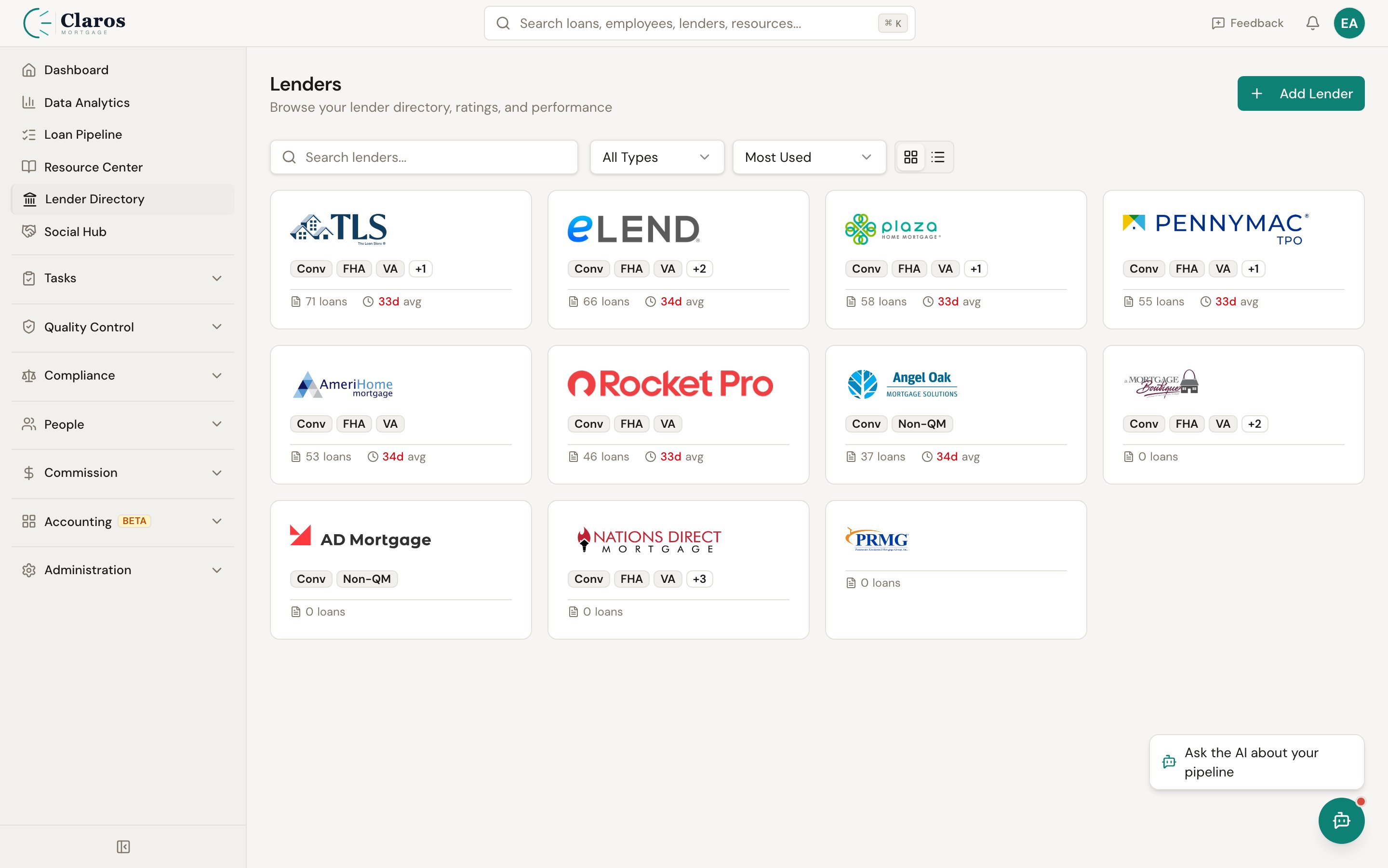
## Viewing lenders
Go to **Directories > Lenders** in the sidebar. Each lender shows:
* **Name** and optional display name
* **NMLS number**
* **Rating** (if one has been set)
* **Product types** they support
 ***
## Adding a new lender
1. Navigate to **Directories > Lenders**.
2. Click **Add Lender**.
3. Complete the form sections described below.
4. Click **Create Lender**.
The lender form is organized into four sections.
### Lender Information
| Field | Required | Description |
| --------------------- | -------- | ------------------------------------------------------------------------ |
| **Lender Name** | Yes | The full legal or commonly used name (e.g., "United Wholesale Mortgage") |
| **Display Name** | No | A shorter name for display in tables and dropdowns (e.g., "UWM") |
| **NMLS #** | No | The lender's NMLS number |
| **Logo URL** | No | A URL pointing to the lender's logo image |
| **Corporate Address** | No | The lender's main corporate address |
| **Portal Link** | No | URL to the lender's broker/correspondent portal for quick access |
### Program IDs
These are the identification numbers your company uses when submitting loans to this lender. They vary by loan program.
| Field | Description |
| ------------- | ------------------------------------------------------------------- |
| **Client ID** | Your company's client/broker identifier with this lender |
| **FHA ID** | Your FHA lender identification number for this lender's FHA program |
| **VA ID** | Your VA lender identification number for this lender's VA program |
| **EPO** | Early Payoff identifier or terms reference |
### Product Types
Select all loan product types that this lender offers. This helps your team know which lenders to consider for a given loan scenario.
| Product Type | Description |
| -------------------- | ------------------------------------------------------------------------------ |
| **Conventional** | Conforming and non-conforming conventional loans |
| **FHA** | Federal Housing Administration insured loans |
| **VA** | Veterans Affairs guaranteed loans |
| **USDA** | US Department of Agriculture rural development loans |
| **Non-QM** | Non-Qualified Mortgage products (bank statements, asset depletion, DSCR, etc.) |
| **Reverse Mortgage** | Home Equity Conversion Mortgages (HECMs) and proprietary reverse products |
| **HELOC** | Home Equity Line of Credit products |
| **Commercial** | Commercial and multifamily lending |
| **HELOAN** | Home Equity Loan (fixed-rate second lien) products |
Product types are selected via checkboxes. You can select as many as apply.
### Insurance Clauses
Lenders require specific language for insurance policies. Store these clauses here so your team can easily reference them when ordering insurance.
| Field | Description |
| ------------------------------------- | ---------------------------------------------------------------------------------------------------- |
| **Hazard Insurance Mortgagee Clause** | The exact text required by the lender to appear on homeowner's insurance policies |
| **Title Insurance Mortgagee Clause** | The exact text required by the lender to appear on title insurance policies |
| **Notes** | General notes about this lender (underwriting quirks, special guidelines, contact preferences, etc.) |
***
## Managing lender contacts
Each lender can have multiple contacts -- account executives, underwriters, closers, and other representatives. Contacts are managed from the lender detail/edit page.
### Contact fields
| Field | Required | Description |
| ---------------- | -------- | --------------------------------------------------------------------------------------------------------------------------------------------------------- |
| **Name** | Yes | Full name of the contact |
| **Title / Role** | No | The contact's role at the lender (e.g., "Account Executive," "Underwriting Manager") |
| **Email** | No | Contact email address |
| **Phone** | No | Contact phone number |
| **Primary** | No | Check this to designate the contact as the primary point of contact for this lender. The primary contact is highlighted with a badge in the contact list. |
### To add a contact
1. Navigate to the lender's detail or edit page.
2. In the **Contacts** card, click **Add Contact**.
3. Fill in the contact fields.
4. Click **Add Contact** to save.
### To edit a contact
1. On the lender page, find the contact in the list.
2. Click the pencil (edit) icon.
3. Update the fields.
4. Click **Save**.
### To delete a contact
1. Click the trash icon next to the contact.
2. The contact is removed immediately.
Deleting a contact is immediate and cannot be undone. Make sure you no longer need the contact record before removing it.
***
## Editing a lender
Go to **Directories > Lenders**, click the lender you want to edit, update any fields, and click **Save Changes**.
***
## How lenders relate to other data
### Loans
Every loan in Keystone is associated with a lender. The lender determines which program IDs and insurance clauses apply, and it appears in loan-level reporting and analytics.
### Commission rules
Commission templates can include rules that are scoped to specific lenders. For example, you might have a higher or lower commission split for loans submitted to a particular wholesale lender.
### Analytics
The analytics dashboard includes lender-level breakdowns, allowing you to see volume, units, and revenue by lender over time.
***
## Related pages
* [Employees](/company-setup/employees) -- employees originate loans with lenders
* [Lead Sources](/company-setup/lead-sources) -- lead sources and lenders are both used in commission rule scoping
* [Company Settings](/company-setup/company-settings) -- company-level LOS configuration affects how loan data flows from lenders
***
## Adding a new lender
1. Navigate to **Directories > Lenders**.
2. Click **Add Lender**.
3. Complete the form sections described below.
4. Click **Create Lender**.
The lender form is organized into four sections.
### Lender Information
| Field | Required | Description |
| --------------------- | -------- | ------------------------------------------------------------------------ |
| **Lender Name** | Yes | The full legal or commonly used name (e.g., "United Wholesale Mortgage") |
| **Display Name** | No | A shorter name for display in tables and dropdowns (e.g., "UWM") |
| **NMLS #** | No | The lender's NMLS number |
| **Logo URL** | No | A URL pointing to the lender's logo image |
| **Corporate Address** | No | The lender's main corporate address |
| **Portal Link** | No | URL to the lender's broker/correspondent portal for quick access |
### Program IDs
These are the identification numbers your company uses when submitting loans to this lender. They vary by loan program.
| Field | Description |
| ------------- | ------------------------------------------------------------------- |
| **Client ID** | Your company's client/broker identifier with this lender |
| **FHA ID** | Your FHA lender identification number for this lender's FHA program |
| **VA ID** | Your VA lender identification number for this lender's VA program |
| **EPO** | Early Payoff identifier or terms reference |
### Product Types
Select all loan product types that this lender offers. This helps your team know which lenders to consider for a given loan scenario.
| Product Type | Description |
| -------------------- | ------------------------------------------------------------------------------ |
| **Conventional** | Conforming and non-conforming conventional loans |
| **FHA** | Federal Housing Administration insured loans |
| **VA** | Veterans Affairs guaranteed loans |
| **USDA** | US Department of Agriculture rural development loans |
| **Non-QM** | Non-Qualified Mortgage products (bank statements, asset depletion, DSCR, etc.) |
| **Reverse Mortgage** | Home Equity Conversion Mortgages (HECMs) and proprietary reverse products |
| **HELOC** | Home Equity Line of Credit products |
| **Commercial** | Commercial and multifamily lending |
| **HELOAN** | Home Equity Loan (fixed-rate second lien) products |
Product types are selected via checkboxes. You can select as many as apply.
### Insurance Clauses
Lenders require specific language for insurance policies. Store these clauses here so your team can easily reference them when ordering insurance.
| Field | Description |
| ------------------------------------- | ---------------------------------------------------------------------------------------------------- |
| **Hazard Insurance Mortgagee Clause** | The exact text required by the lender to appear on homeowner's insurance policies |
| **Title Insurance Mortgagee Clause** | The exact text required by the lender to appear on title insurance policies |
| **Notes** | General notes about this lender (underwriting quirks, special guidelines, contact preferences, etc.) |
***
## Managing lender contacts
Each lender can have multiple contacts -- account executives, underwriters, closers, and other representatives. Contacts are managed from the lender detail/edit page.
### Contact fields
| Field | Required | Description |
| ---------------- | -------- | --------------------------------------------------------------------------------------------------------------------------------------------------------- |
| **Name** | Yes | Full name of the contact |
| **Title / Role** | No | The contact's role at the lender (e.g., "Account Executive," "Underwriting Manager") |
| **Email** | No | Contact email address |
| **Phone** | No | Contact phone number |
| **Primary** | No | Check this to designate the contact as the primary point of contact for this lender. The primary contact is highlighted with a badge in the contact list. |
### To add a contact
1. Navigate to the lender's detail or edit page.
2. In the **Contacts** card, click **Add Contact**.
3. Fill in the contact fields.
4. Click **Add Contact** to save.
### To edit a contact
1. On the lender page, find the contact in the list.
2. Click the pencil (edit) icon.
3. Update the fields.
4. Click **Save**.
### To delete a contact
1. Click the trash icon next to the contact.
2. The contact is removed immediately.
Deleting a contact is immediate and cannot be undone. Make sure you no longer need the contact record before removing it.
***
## Editing a lender
Go to **Directories > Lenders**, click the lender you want to edit, update any fields, and click **Save Changes**.
***
## How lenders relate to other data
### Loans
Every loan in Keystone is associated with a lender. The lender determines which program IDs and insurance clauses apply, and it appears in loan-level reporting and analytics.
### Commission rules
Commission templates can include rules that are scoped to specific lenders. For example, you might have a higher or lower commission split for loans submitted to a particular wholesale lender.
### Analytics
The analytics dashboard includes lender-level breakdowns, allowing you to see volume, units, and revenue by lender over time.
***
## Related pages
* [Employees](/company-setup/employees) -- employees originate loans with lenders
* [Lead Sources](/company-setup/lead-sources) -- lead sources and lenders are both used in commission rule scoping
* [Company Settings](/company-setup/company-settings) -- company-level LOS configuration affects how loan data flows from lenders